

In Part 1 we looked at how we architect our agentic framework at Enlyft: orchestration, microservices, and configuration-driven workflows. One question we left open: how do external systems and clients talk to that framework in a consistent, future-proof way? REST APIs work, but they tend to create tight coupling and custom glue in every integration.
At Enlyft we wanted our agent capabilities (company enrichment, buyer personas, account intelligence, and more) to be discoverable and composable so that partners, products, and AI assistants could use them without each team reinventing the integration.
The answer we adopted is Model Context Protocol (MCP), an open standard from Anthropic that provides a single, standardized way to expose capabilities as tools, resources, and prompts. MCP uses JSON-RPC 2.0 and works across transports (HTTP, stdio, etc.), so any MCP-compatible client can talk to any MCP server. The full specification is at here. This article explains why MCP matters for integration, how we use it at Enlyft, and what patterns make it work in production. We stick to concepts and diagrams, with no code.
The Integration Challenge
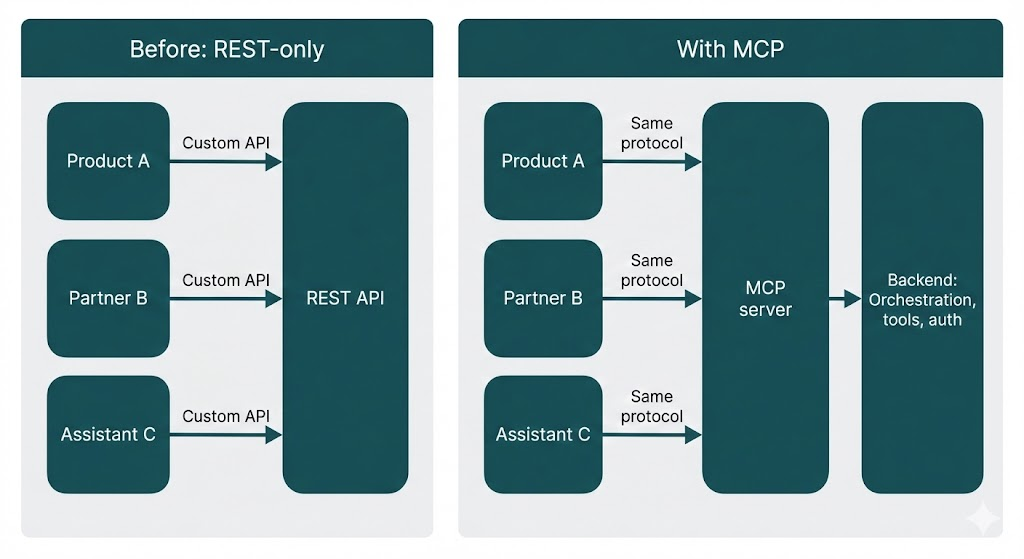
Agent frameworks usually expose capabilities over REST: dedicated endpoints per use case, custom request/response shapes, and client-specific SDKs. That's fine for a single consumer, but as you add more clients (internal products, partner apps, AI assistants, or future UIs), you run into familiar problems:
| Problem | What happens |
|---|---|
| Tight coupling | Every client depends on specific API contracts; changing a backend forces coordinated updates everywhere. |
| No discovery | There's no standard way for a client to ask "what can this server do?" at runtime. |
| Inconsistent patterns | Each integration invents its own error handling, auth, and retries. |
| Versioning pain | New capabilities or breaking changes require careful versioning and migration across all consumers. |
This is often called the "N times M" problem: N client applications need to talk to M data sources or tools, so you end up with N×M custom integrations. MCP replaces that with a single protocol: every client speaks MCP to every server, so you get fungibility. You can swap or add clients and servers without rewriting glue code.
The goal: a protocol layer that hides implementation details and lets clients discover and call capabilities in a uniform way, so you can evolve the backend without breaking every integration.
MCP is that layer. It defines a common vocabulary (tools, resources, prompts) and a standard request/response protocol, so any MCP-compatible client can talk to any MCP server, including ours, without custom adapters.
What Is MCP?
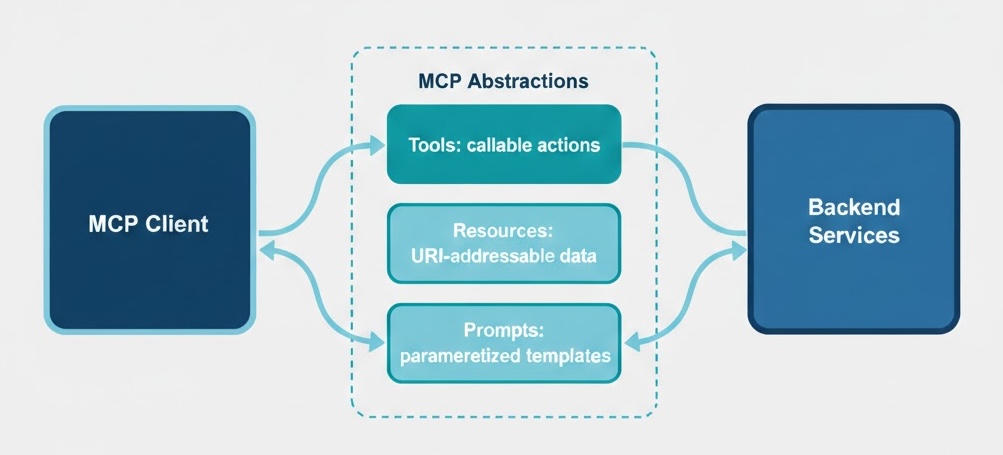
Model Context Protocol (MCP) is an open protocol for exposing capabilities to AI agents and applications. It standardizes three kinds of capabilities:
- Tools. Callable functions that do something (e.g. "get company data by domain," "find decision makers," "generate an account brief"). Agents and clients discover and invoke them by name and parameters.
- Resources. Read-only data identified by URIs (e.g. a document, a catalog, or a configuration). Clients can list and read them without custom endpoints.
- Prompts. Parameterized prompt templates for common tasks (e.g. "summarize this account" with placeholders for company ID and format). Clients request a prompt by name and get a ready-to-use string.
Together, these give you discovery (clients can list what's available), composability (tools and resources can be combined in workflows), and protocol independence (the same model works over HTTP, stdio, or other transports).
At Enlyft, tools are the main integration surface: they map directly to our agent and data capabilities (company enrichment, contact lookup, buyer personas, buying signals, account briefs, etc.). Resources and prompts support richer, template-driven workflows without one-off APIs.
Host, Client, and Server: MCP's Mental Model
The MCP spec uses three roles (see MCP architecture):
- Host. The application or process that runs and coordinates things: it creates and manages clients, enforces security and consent, and aggregates context. Think of it as the "container" (e.g. an IDE, a chat app, or an agent runtime).
- Client. The connector that talks to MCP servers. The client is the "AI application or agent" that wants to use external tools and data. It discovers what a server offers (tools, resources, prompts) and invokes them. One host can run many clients; each client typically has one connection to one server.
- Server. The side that exposes capabilities. It wraps underlying systems (databases, APIs, your own backend) and presents them as MCP tools, resources, and prompts. Any MCP-compatible client can then use that server without custom integration.
In our setup at Enlyft, we run the MCP server (it wraps our orchestration and tools). Our products, partner apps, and AI assistants act as clients (or run inside a host that manages MCP clients). The protocol is the only contract between them.
MCP Server: Wrapping Existing Services
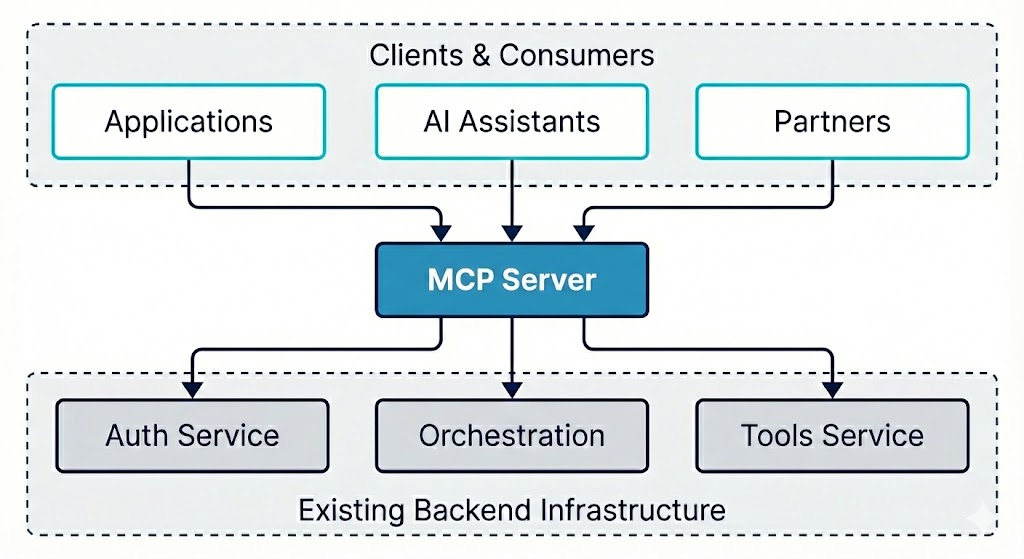
We don't replace our existing services with MCP; we wrap them. The MCP server sits in front of the orchestration and tools services, translates protocol requests into internal calls, and returns results in a unified shape. That way, the same backend that powers our own product can serve external clients through MCP without duplication.
What the server does
- Protocol handling. Accepts MCP (e.g. JSON-RPC) requests and routes them to the right capability (tool, resource, or prompt).
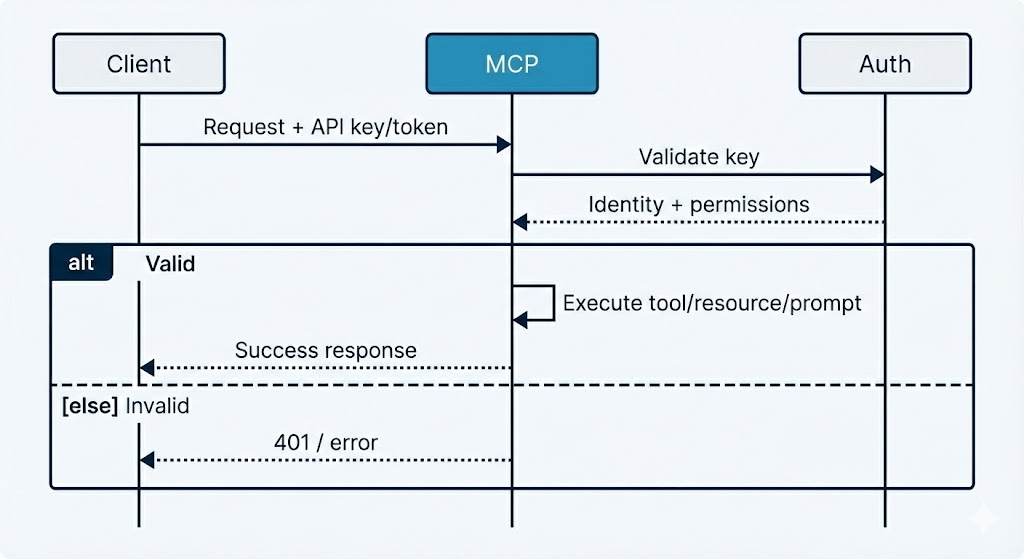
- Authentication. Validates API keys or tokens before executing any capability, and rejects unauthenticated or invalid requests.
- Translation. Maps MCP tool calls to internal service calls (e.g. to the orchestration or tools service), and maps backend responses back into the protocol's response format.
- Middleware. Applies cross-cutting behavior: logging, timing, error handling, and rate limiting so that every request is consistent and observable.
The server stays thin: it's a protocol adapter, not a second implementation of business logic. All real work stays in the existing services.
Tools, Resources, and Prompts
Tools
Tools are the primary way we expose agent capabilities. Each tool has a name, a parameter schema (what inputs it accepts), and a behavior implemented by calling our backend (orchestration or tools service). Clients discover the list of tools and their schemas during initialization of the MCP client, then invoke them by name with arguments.
In MCP's design, tools are model-controlled: the language model (or agent) decides when to call a tool based on the user's request and the tool's description. The server only declares what tools exist and what parameters they take. The client (and the model behind it) decides when and how to use them.
Design principles we follow
- Structured responses. Every tool returns a consistent shape: success payload plus optional error and context (e.g. which tenant or configuration was used). Clients don't have to guess; they always get a predictable structure.
- Context propagation. When a tool implicitly selects a "solution" or "buyer persona" (e.g. from the authenticated user), we return that context in the response so the client knows what was used and can display or cache it.
- Errors as data. Tools don't throw; they return an error field and optional context (e.g. "here are the solutions you can choose from"). Error messages are written in plain English so the LLM (the caller) can understand what went wrong and how to fix or retry. That keeps the protocol stable and avoids leaking internal stack traces.
Conceptually, our tools cover things like: company enrichment (firmographics by domain), contact discovery (decision makers matching a buyer persona), buying signals, account briefs (AI-generated reports), and technology lookup. The exact set evolves; the important part is that they're all exposed through the same tool abstraction and backend.
Resources
Resources are read-only, URI-identified data. Clients can list available resources and fetch one by URI. Use cases include static or slowly changing data: reference catalogs, configuration, or precomputed assets. In MCP, resources are application-driven: the host or client application decides how to use them (e.g. show a list, filter by search, or auto-include based on context). At Enlyft we use resources where we want URI-based, cacheable access without adding new REST endpoints.
Prompts
Prompts are templates: a name plus parameters (e.g. "account_id", "format"). The client requests a prompt by name with arguments; the server returns a fully resolved string (e.g. for an LLM). In MCP, prompts are user-controlled: they're meant to be explicitly chosen by the user (e.g. via a slash command or menu), so the user knows what instruction is being sent. That keeps prompt logic on the server and lets clients stay simple: they just ask "give me the prompt for X" and use the result.
Protocol and Authentication
Request/Response Protocol
MCP builds on JSON-RPC 2.0: requests carry a method name, parameters, and a request ID; responses carry a result or a standard error object and the same ID so clients can match async responses. That gives you a single, well-understood format for tools, resources, and prompts across transports (HTTP, stdio, etc.). Before any tool or resource calls, the client and server go through an initialization handshake: they exchange protocol version and capability negotiation (which features each side supports, e.g. tools, resources, prompts, subscriptions). Only after that does normal operation begin, so both sides know what they can safely use.
Stateless vs stateful MCP server
MCP can run in two modes over HTTP. In stateful mode, the client opens a long-lived session: one initialize handshake, then all requests run in that session. The server keeps session state, so load balancers often need to send the same client to the same server instance ("sticky" routing). In stateless mode, each request is self-contained (or the client sends what's needed per request). The server does not keep session state between requests, so any instance can handle any request.
At Enlyft, we run our MCP server in stateless mode. That gives us simpler scaling and load balancing (no sticky sessions), and it fits how we deploy other HTTP services: we can add or remove instances and let the load balancer send traffic to any healthy instance.
Authentication
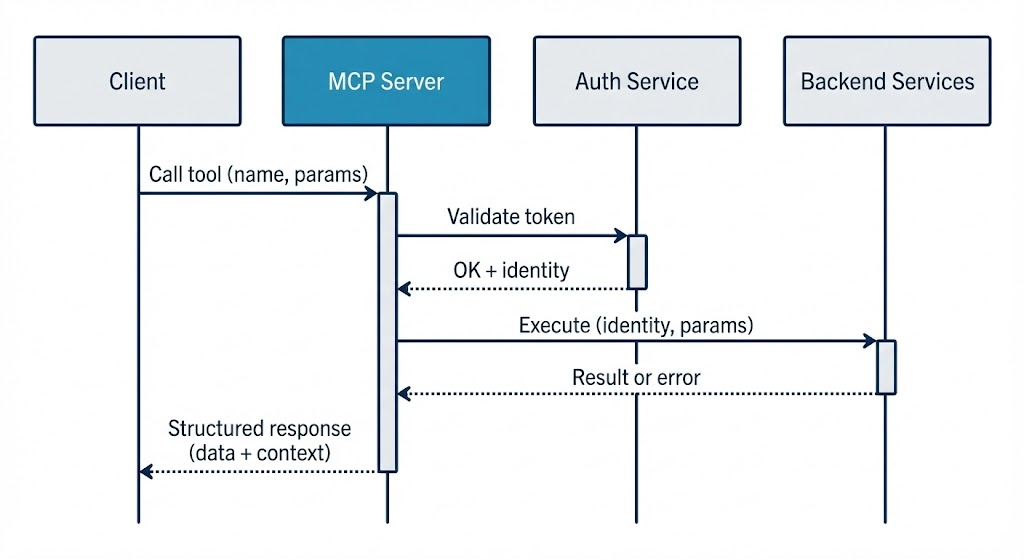
Every request that performs an action (e.g. calling a tool) goes through authentication. The server validates the API key or token (e.g. via an auth service), resolves the identity (tenant, user, allowed solutions or personas), and only then runs the capability. Invalid or missing credentials get a clear error, and no internal data is exposed.
We extract identifiers (e.g. solution ID, user ID) from the validated token and pass them into backend calls so that tools run in the right tenant context and respect permissions. That keeps multi-tenancy and access control in one place (auth + backend) instead of in each client.
Rate Limiting and Resilience
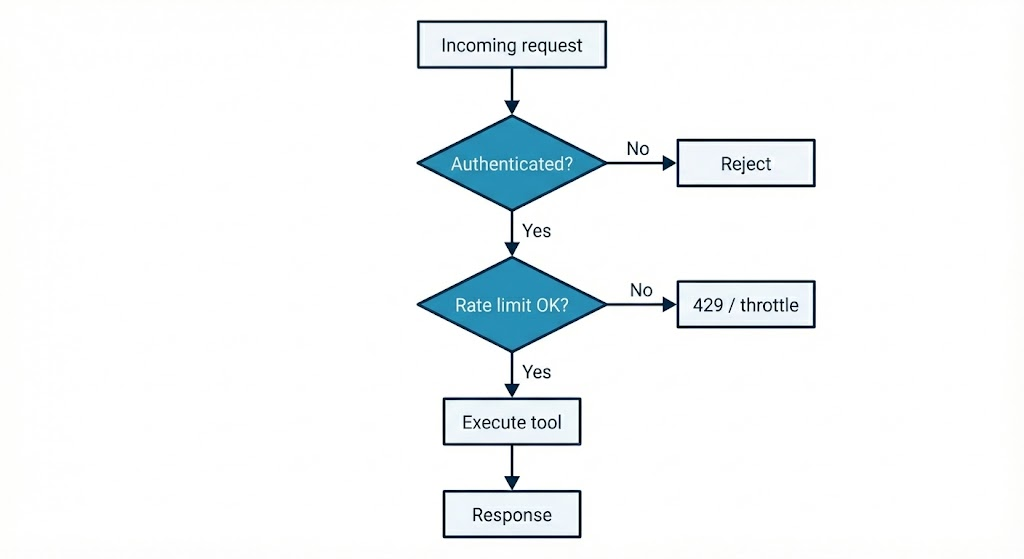
External clients can't be allowed to unboundedly call expensive tools. We apply rate limiting so that each client (and optionally each tool) is subject to limits (e.g. N requests per minute). Limits are enforced in the MCP server layer, often with a sliding-window or token-bucket policy backed by a shared store (e.g. Redis) so that limits apply across server instances.
Why it matters
- Per-tool limits. Expensive operations (e.g. full account briefs) can have stricter limits than cheap lookups.
- Per-client limits. A single misbehaving or compromised client doesn't starve others.
- Observability. Throttled requests are logged and can be metered so you can tune limits and detect abuse.
Combined with structured error responses and retries on the client side, rate limiting makes the MCP layer resilient and fair under load.
Client Integration Patterns
- Discovery first. Clients typically discover capabilities at startup or when connecting: list tools (and their schemas), resources, and prompts. That way, the client can present options to users or agents and build typed or validated calls. Caching this list is common so you don't re-discover on every request.
- Service layer abstraction. Applications usually don't talk to MCP directly from the UI. They introduce a service layer that wraps the MCP client, maps tool calls to domain operations, and translates protocol errors into application errors. That keeps the rest of the app independent of the protocol and makes testing easier (e.g. mock the service, not the wire format).
- Error handling and retries. Clients should treat errors as first-class: check the response shape, surface user-friendly messages when possible, and retry only on transient failures (e.g. network timeouts, 429s after a short backoff). Permanent failures (e.g. invalid input, auth failure) should not be retried blindly.
Evaluating the MCP Server
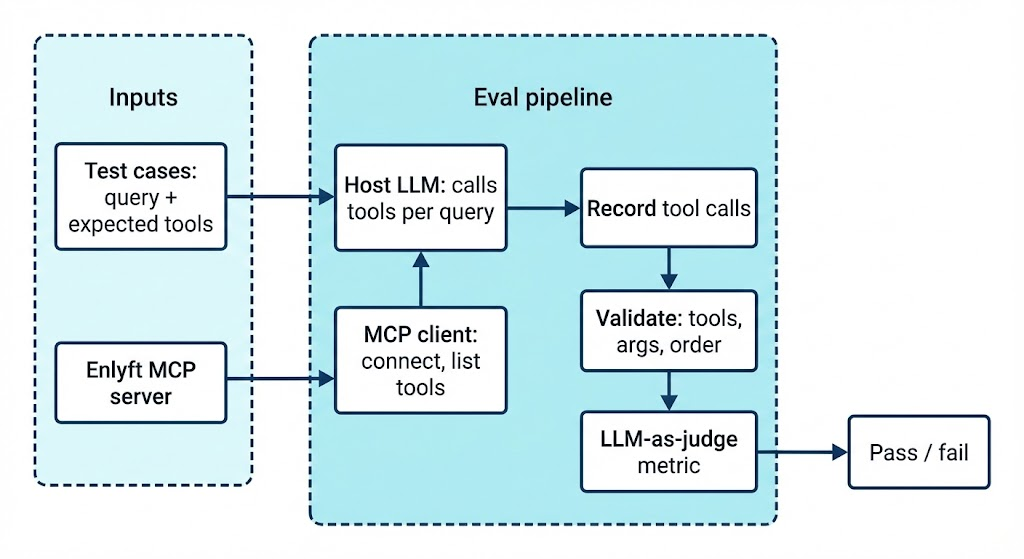
We run automated evaluations to ensure the MCP server behaves correctly: the right tools are discovered and invoked with the right arguments and in the right order (e.g. company enrichment before decision makers). Each test case is a natural-language user query; a host LLM (given the list of MCP tools) decides which tools to call. The test runner connects to the MCP server as a client, forwards those tool calls, and records name, arguments, and results.
We then check that expected tools were used with the right parameters and in the correct sequence (e.g. company enrichment before decision makers, decision makers before contact enrichment). An LLM-as-judge metric scores whether the primitive usage and arguments were correct. These evals catch regressions when we change prompts, tool schemas, or the backend.
Test cases are defined in JSON (input query, expected tools, optional expected arguments). The implementation lives in our evals suite; for the full flow, validations, and CI setup, see the Testing and Evaluation article (Part 10 of this series).
Libraries and tools we use
| Purpose | What we use |
|---|---|
| MCP server framework | FastMCP and FastAPI: we build the Enlyft MCP server with FastMCP (protocol compliance, tool/resource registration) on top of FastAPI (HTTP app, middleware, lifecycle). |
| MCP client & transport | MCP Python SDK: client session, list_tools, call_tool, and streamable-HTTP transport to talk to the Enlyft MCP server. |
| Eval framework & MCP metric | DeepEval: test case types (e.g. input, actual output, expected tools, MCP tools called), evaluate(), and MCPUseMetric (LLM-as-judge for tool use and argument correctness). See DeepEval MCP docs. |
| Host LLM & judge | An OpenAI-compatible API (e.g. OpenRouter or OpenAI) to run the host LLM that calls MCP tools and the judge model that scores results. |
| Test runner | pytest: parametrized test cases, async execution, and skip when the MCP server URL is not configured. |
Composability and Security
In MCP, the distinction between client and server is logical, not physical. The same application can act as both: for example, an agent might be an MCP client when it calls our Enlyft MCP server, and an MCP server when it exposes its own tools to another agent or app. That enables layered and chained systems: a primary agent (client) talks to a specialized sub-agent (server), which in turn can be a client to other MCP servers (e.g. search, files, APIs). You get modular, composable agent architectures without a single monolithic backend, similar in spirit to how the Language Server Protocol standardized language tooling across editors.
Security and trust
MCP enables powerful behavior (arbitrary data access and tool execution), so security and trust are part of the design. Implementations should:
- User consent and control. Users should explicitly consent to what data is shared and what tools are run. Clear UIs for reviewing and authorizing actions help.
- Data privacy. Don't send user or resource data to servers (or third parties) without consent. Access controls and tenant isolation (as in our auth layer) keep data scoped.
- Tool safety. Tools can perform real actions (APIs, writes, etc.). Treat them as privileged: validate inputs, log invocations, and obtain user approval where appropriate.
- Server isolation. Servers don't need to see the full conversation or each other's data. The host or client can pass only the context necessary for a given tool or resource call, reducing exposure.
At Enlyft we enforce auth and rate limiting at the MCP gateway, pass only the identifiers needed for tenant and permission checks, and return structured errors without leaking internal details. Security is built into the integration layer, not bolted on afterward.
Conclusion and Takeaways
MCP gives us a standard, discoverable way to expose Enlyft's agent capabilities to external systems. By wrapping our existing orchestration and tools in an MCP server, we get one protocol for many clients, without rewriting backend logic or maintaining client-specific APIs.
Takeaways:
- Protocol over custom APIs. A single protocol (MCP) with tools, resources, and prompts reduces coupling and lets you evolve the backend without breaking every integration.
- Tools as the main integration surface. Exposing capabilities as tools makes them discoverable and composable; clients can list and invoke them uniformly.
- Auth and rate limiting at the gateway. Validate identity and enforce limits in the MCP layer so that backend services stay focused on business logic.
- Structured errors and context. Return errors and context (e.g. selected tenant or persona) in a consistent shape so clients can handle them without special cases.
- Thin server, thick backend. The MCP server is an adapter; real behavior stays in your existing services.
MCP isn't just a protocol. It's an enabler for composable AI systems. By standardizing how agents expose capabilities, MCP makes it easier for different clients and agents to work with the same backend without custom glue.
About This Series
This post is Part 2 of an 11-article series on how we build and run our agentic framework at Enlyft. The series is published on tech.enlyft.com and is designed to be read in order:
| Phase | Articles | What you'll learn |
|---|---|---|
| Foundation | 1–2 | Architecture overview (Part 1) and how we expose agents via MCP (this post) |
| Core | 3–4 | Declarative orchestration: configuration-driven workflows, step types, and advanced patterns (nested agents, parallel tasks, loops) |
| Extensibility | 5–6 | Tool system (APIs, search, data platform) and vector search / embeddings at scale |
| Enterprise | 7–8 | Authentication & security (multi-tenant, API keys) and observability & monitoring (tracing, logging, cost) |
| Real-world | 9–11 | Integration patterns (how the platform uses the framework), testing & evaluation, and deployment & operations |
We share architectural decisions, patterns that work in production, and how our engineering culture (Start Simple, Then Scale; Iterate Fast, Learn Faster; Own the Outcome) shapes the way we build. The full index and reading order will be available on tech.enlyft.com as we publish each article.
What's Next
In Part 3 we go deep on agent orchestration: how we build a declarative execution engine so that workflows are defined in configuration (e.g. YAML) rather than code. We'll cover step types, execution context, and how product and domain experts can create and modify agents without deploying new service code. Part 4 continues with advanced orchestration patterns (nested agents, parallel tasks, and loops) so you can model complex, real-world workflows.
If you're interested in how we build AI-native B2B intelligence at scale, check out Enlyft's platform and our Engineering blog. We're always looking for engineers who want to own outcomes and ship agentic systems in production. See Careers at Enlyft for open roles.