

In Part 1 we split orchestration, tools, embeddings, auth, and protocol adapters so the platform can scale like other distributed systems. In Part 2 we showed how MCP exposes capabilities uniformly. One question we left hanging: once you can call tools from a workflow, how does the orchestration service itself represent "what happens next"—without burying that logic in code?
This article goes inside that orchestration layer: the agent document as a contract, the runner and context model, step types, auto_tools, conditions, and streaming.
The Problem: Scripts Do Not Scale
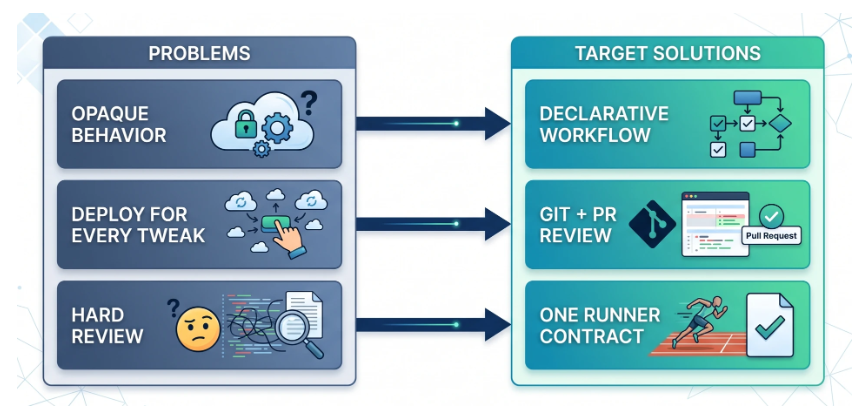
Early agent prototypes are often code-first: prompts and branches live in source files. That breaks down when behavior must be reviewed, diffed, and owned by people who are not shipping the service binary every week.
We wanted workflows as data: load a document, validate it, run it through one execution pipeline with consistent logging, auth, tool calls, and cost attribution.
The Agent Document as a Contract
Below is a full example agent YAML that intentionally includes the major step families in one place: planning (reason), deterministic tools (auto_tools), model-selected tools (use_tools), nested parallelization (tasks), delegation (agent), bounded iteration (loop), and final formatting (template_output).
agent_name: "Research Synthesis Agent"
agent_type: "research_synthesis"
default_model: "provider/model-lite"
seed: 42

task_brief: |
  Build a concise research brief from mixed sources.
  Keep claims grounded in tool outputs.

steps:
  - id: plan
    step_type: reason
    prompt: |
      Create a 5-point research plan for: {{ topic }}

  - id: gather_sources
    step_type: auto_tools
    parallel: true
    tool_calls:
      - tool_name: websearch
        params:
          query: "{{ topic }}"
          max_results: "{{ max_results | default(5) }}"
        fail_on_error: true
      - tool_name: crawler
        params:
          urls: "{{ seed_urls | default([]) }}"
          max_pages: "{{ max_pages | default(10) }}"
        fail_on_error: false

  - id: investigate
    step_type: use_tools
    mandatory_tools: ["websearch"]
    optional_tools: ["crawler"]
    max_cycles: 3
    prompt: |
      Use tools as needed to fill evidence gaps in the plan.

  - id: enrich_parallel
    step_type: tasks
    max_concurrency: 2
    tasks:
      - id: summarize_findings
        step_type: reason
        prompt: |
          Summarize top findings from gather_sources and investigate.
      - id: extract_risks
        step_type: reason
        prompt: |
          Identify confidence risks and missing data.

  - id: specialist_pass
    step_type: agent
    agent_type: "domain_specialist_example"
    params:
      topic: "{{ topic }}"
      draft_summary: "{{ enrich_parallel.summarize_findings.output }}"

  - id: refine_loop
    step_type: loop
    max_iterations: 2
    stop_when: "{{ context.refinement_score | default(0) >= 0.9 }}"
    steps:
      - id: improve_draft
        step_type: reason
        prompt: |
          Improve clarity and tighten evidence links.

  - id: output
    step_type: template_output
    format: markdown
    template: |
      # Research Brief: {{ topic }}
      ## Key points
      {{ specialist_pass.output.summary }}
      ## Risks
      {{ enrich_parallel.extract_risks.output }}
      ## Sources
      {{ gather_sources.auto_tool_results | tojson }}

sample_input:
  topic: "Example market topic"
  max_results: 5
  max_pages: 10
  seed_urls:
    - "https://example.com/source-1"
    - "https://example.com/source-2"
How to Read This Configuration
Each field in the document has a specific purpose:
| Field / Step Type | What it does |
|---|---|
agent_name / agent_type | Identity for routing, policy, and observability |
default_model | Baseline model unless a step overrides it |
task_brief | Durable system instruction rendered with Jinja2 variables from runtime input |
reason | Model-only synthesis/planning step |
auto_tools | Fixed tool fan-out (websearch, crawler) decided by config, not by the model |
use_tools | Model gets controlled choice among allowed tools with cycle caps |
tasks | Concurrent child steps with explicit concurrency controls |
agent | Delegate a sub-workflow to another agent contract with explicit parameters |
loop | Bounded iteration with hard caps and a stop condition |
template_output | Deterministic final rendering from prior step outputs |
sample_input | Executable documentation for tests, playgrounds, and onboarding |
Each agent is a structured document (we use YAML on disk; the same structure validates as JSON before execution). At minimum it carries:
- Identity — logical name and type for logging and routing.
- Default model — fallback when a step does not override.
task_brief— durable "system" instructions; we render it with Jinja2 so caller parameters can personalize behavior without duplicating whole prompts. Jinja2 is a small template language: placeholders like{{ record_id }}are filled from a dictionary at runtime, so one brief text can serve many tenants or use cases.steps— ordered list of typed steps; each step has anid,step_type, and type-specific fields.
This is where Pydantic matters most: it validates not just top-level fields but nested step-specific schemas (including tool call shape, loop constraints, and task definitions) so invalid combinations fail before the runner starts. That makes YAML reviewable in PRs and safe in production.
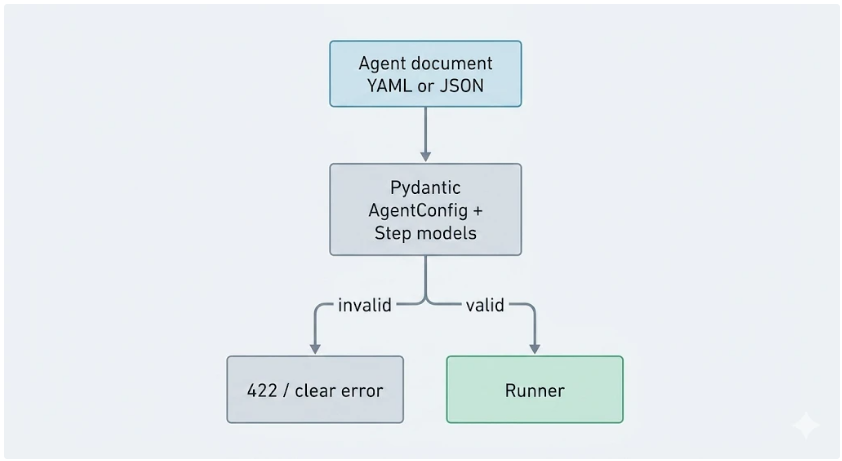
If you build this yourself: keep validation strict and version your schema; soft failures at runtime are expensive when every failure is a customer-visible agent run.
Agent Runner Flow: API Request to Final Output
The practical question is not just "what is in YAML," but "how does one API call become a fully executed run with tools, caching, and output?" In production, the runner path is roughly:
- REST API receives request with
agent_type(or inline document), input payload, auth context, and optional flags (stream,no_cache, debug controls). - Load + validate agent document (file-backed or API-supplied) via Pydantic.
- Create execution context: request-scoped metadata (tenant/user/execution IDs), serializable input parameters, and runtime flags.
- Resolve caches before execution:
- Agent-level cache (Postgres) can short-circuit full runs for repeated identical requests under the same tenant/policy constraints.
- Step-level caches can skip specific expensive steps when their input hashes match.
- Run validated steps in order (or by each step's control semantics:
tasks/loop/agent), dispatching tool calls through the tools service when required. - Merge outputs into context under stable step IDs so later steps and templates can reference prior results.
- Finalize response as single payload (non-stream) or NDJSON chunks (stream mode).
- Persist execution artifacts (usage, timings, cache hits/misses, tool execution IDs, errors) asynchronously for billing, debugging, and analytics.
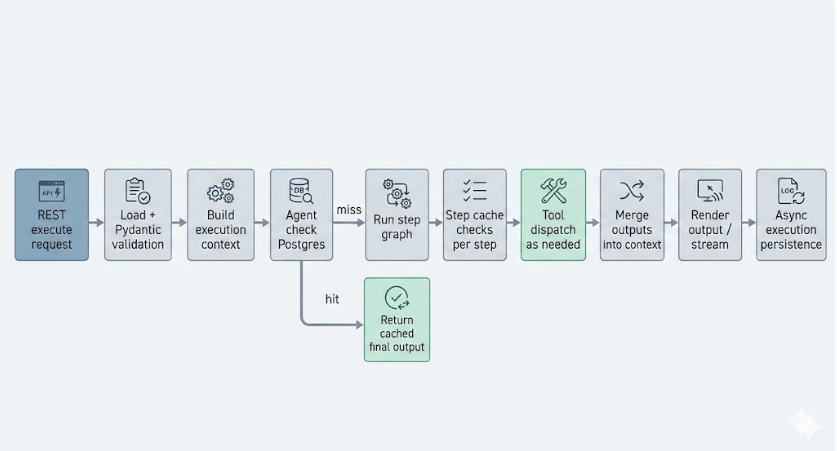
Why this flow matters: it gives one consistent contract from HTTP boundary to tool execution and output, while still allowing targeted performance wins through agent and step caching.
Step Types as Vocabulary
Each step_type picks an implementation class from a small registry. Think of types as verbs in your orchestration language:
| Step Type | Role in one sentence |
|---|---|
reason | Model synthesis / planning; optional prompt_data can attach structured JSON beside the main prompt so the model sees both prose and tables |
auto_tools | Call a fixed list of tools with parameters drawn from context—parallel or sequential; the model does not choose the list at runtime |
use_tools | The model chooses which tools to call from mandatory and/or optional sets, for up to max_cycles rounds of "think → call tools → observe results" |
tasks | Run child step objects under one parent with dependencies and concurrent waves |
agent | Run another agent definition with interpolated parameters only |
loop | Repeat nested steps until a cap, a criterion, or a sentinel |
template_output | Final artifact for the caller—free-form or template-driven |
Tool Steps: auto_tools and use_tools
In practice, most workflows need two different tool behaviors, and they solve different product problems:
auto_tools — Deterministic Tool Execution
Use this when you already know exactly which tools should run. The config explicitly declares each call, parameters, retry/error behavior, and optional conditions.
- Best for predictable enrichment or required pre-processing.
- Supports parallel fan-out for independent calls.
- Keeps behavior reviewable in YAML and easy to test.
- Combines well with
template_outputbecause output paths are explicit.
use_tools — Model-Directed Tool Execution Within Guardrails
Use this when the model should decide which tool to call next based on intermediate results.
- You still constrain the tool universe (
mandatory_tools,optional_tools). max_cyclesprevents unbounded loops and runaway cost.- Useful for exploratory flows where the next query depends on tool results.
- Produces richer behavior, but needs stronger observability and cost controls.
Both step types still support the same core safety posture: typed tool schemas, structured errors, and clear run-level traceability. The design choice is about control surface: deterministic config (auto_tools) vs bounded agentic selection (use_tools).
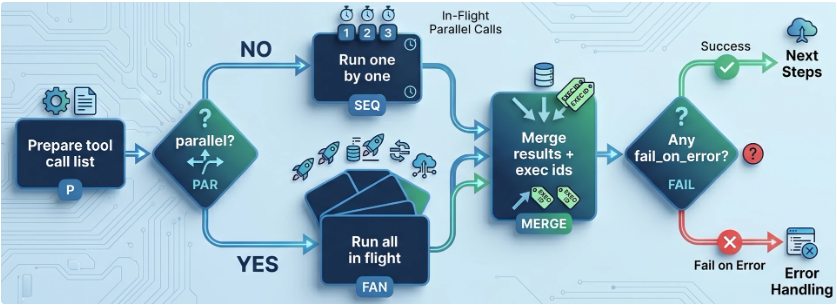
If you build this: record tool execution IDs alongside LLM usage so support can correlate "which enrichment failed" without replaying prompts.
Conditions and Skipping
Step-level conditions are boolean expressions evaluated against the same context dictionary that templates use for {{ ... }}. If a condition is false, the entire step is skipped—no LLM call, no tools.
If evaluation errors, we log and bias toward skipping or continuing the run rather than failing the whole customer request. A short "step skipped" note can still be attached to the model conversation history so operators see that the branch was skipped, not only silence.
A typo in a condition should not become a site-wide outage—exact behavior depends on outer guards, but the intent is graceful degradation over hard failure.
Streaming vs Non-Streaming — One Runner, Two Behaviors
Today's production path is a sequential runner over validated steps: step 1 completes, its output is merged into context, then step 2 runs, and so on. stream=true does not change that graph; it changes how the HTTP response body is delivered.
Chunks are emitted as newline-delimited JSON (NDJSON): each line is a small JSON object (token delta, tool progress, final payload, etc.) so UIs can render incrementally without waiting for the full run.
Error handling deliberately differs between the two modes:
- Non-streaming: Certain tool/step failures can be converted into a structured agent output (HTTP 200 with
success: falsestyle payloads—exact shape is part of your API contract). - Streaming: Exceptions are allowed to propagate so the TCP stream ends cleanly and clients do not sit on a half-open connection that never signals failure.
If you build this: treat streaming as a first-class contract—document chunk shapes, flush boundaries, and what "done" means—before product teams depend on it.
Tracing: One Logical Run Across Services
Even inside one orchestration process, a single agent run triggers outbound HTTP to model providers and to the tools service. We copy a small allowlist of incoming headers (request ID, agent type, optional trace sampling override) into outbound client calls so logs and APM traces can join on the same identifiers without every developer hand-wiring headers.
The key correlation structure is simple: an execution ID for the agent run plus tool execution IDs per tool dispatch give support a spine to follow when something fails mid-workflow. Part 8 expands this into dashboards and SLOs.
Step Cache: Speed Without Poisoning Context
Some steps declare an optional TTL cache keyed on a hash of their inputs (parameters + relevant context slices). Because cache entries may be written to Redis or a DB, everything in the key must be JSON-serializable—which reinforces why raw Request objects never enter context.
When no_cache is set on a run, lookups are bypassed so debugging sees fresh tool and model behavior.
Execution Logging and Metering
Each completed run records metadata (agent type, token counts, timing, linked tool execution IDs) in a durable store for billing and postmortems. That is separate from the debug flag, which may attach richer internal detail to a response for developers but should stay off for customer traffic.
Principles
- Start Simple, Then Scale — A linear steps list covers most workflows before
tasks/agent/loop. - Own the Outcome — Explicit step IDs and structured outputs make ownership obvious when something fails.
- Iterate Fast, Learn Faster — Git-reviewed YAML and the same validation path for ad-hoc API payloads shorten the loop from idea to measured behavior.
Conclusion and Takeaways
Orchestration at Enlyft is intentionally boring infrastructure: one document schema, one primary runner loop, typed steps, a serializable context, and streaming as a transport mode. That boring core is what lets many agents share tools, auth, and observability without forking ad hoc runtimes.
Takeaways:
- Validate once, run everywhere — Same Pydantic models for file-backed configs and for inline workflow documents passed through the API.
- Context is a contract — Key outputs by
step_id; keep only JSON-safe values in the blackboard. - Step types are composable verbs — They encode control flow patterns product teams actually ask for.
auto_toolsis your batch integration lane — Parallelism, per-tool conditions, and groupedfail_on_errorsemantics belong here.- Streaming is a product API — Same steps, different error and chunk contract—document it explicitly.
If you copy one idea, copy one runner and one schema: every entry path—file, API-supplied document, batch—should hit the same validation and execution code so "works in tests" means "works in prod."
About This Series
This post is Part 3 of an 11-article series on how we build and run our agentic framework at Enlyft. The series is published on tech.enlyft.com and is designed to be read in order:
| Phase | Articles | What you'll learn |
|---|---|---|
| Foundation | 1–2 | Architecture overview (Part 1) and how we expose agents via Model Context Protocol MCP (Part 2) |
| Core | 3–4 | Declarative orchestration (this post): documents, context, steps, auto_tools, streaming—and Part 4 on tasks, agent, and loop |
| Extensibility | 5–6 | Tool system (APIs, search, data platform) and vector search / embeddings at scale |
| Enterprise | 7–8 | Authentication & security (multi-tenant, API keys) and observability & monitoring (tracing, logging, cost) |
| Real-world | 9–11 | Integration patterns (how the platform uses the framework), testing & evaluation, and deployment & operations |
We'll share architectural decisions, patterns that work in production, and how our engineering culture—Start Simple, Then Scale; Iterate Fast, Learn Faster; Own the Outcome—shapes the way we build. The full index and reading order will be available on tech.enlyft.com as we publish each article.
What's Next
So far, every workflow reads like a single thread: steps run in order, and context grows monotonically. That story breaks the moment product asks for two independent research lanes that merge, a child playbook with its own steps, or "try again until…" without an infinite bill.
In Part 4 we answer it: tasks (dependency waves, concurrency caps, optional aggregation), agent (parameter isolation, nested execution), and loop (hard caps, stopping criteria, iteration history)—the control-flow primitives we reach for when linear steps are not enough.
If you're interested in how we build AI-native B2B intelligence at scale, check out Enlyft's platform and our Engineering blog. We're always looking for engineers who want to own outcomes and ship agentic systems in production—see Careers at Enlyft for open roles.